 MyPaisa
Category budgets
Give your spending a limit you can check.
A budget is easier to use when it answers a small question before the next purchase: how much room is left? MyPaisa brings your category limits and recorded spending together on your Android phone.
Start with one category you recognise
You do not need to plan every rupee before recording your first expense. Start with a category you want to understand better: groceries, food and dining, fuel or shopping. Give that category a monthly limit, then use the purchases you record to see how the month is going.
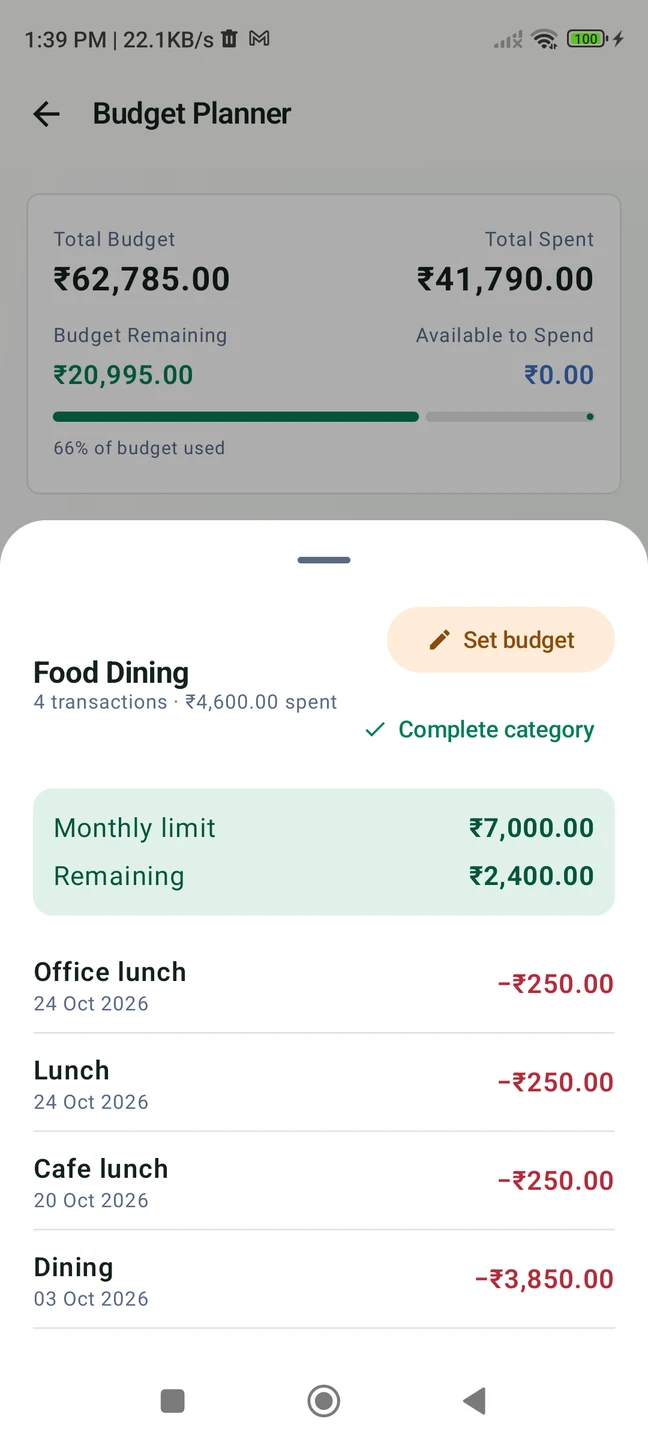
Our fictional Food Dining example has a ₹7,000 limit. Recorded spending is ₹4,600, leaving ₹2,400 available in that budget. The remaining figure is the difference between the category limit and the expenses recorded against it; it is not a live bank balance or a promise that a purchase is affordable.
Build a budget you can return to
- Open Budget in MyPaisa. Choose the category you want to plan and set its monthly limit. Use an amount that fits the spending plan you have chosen.
- Record your purchases consistently. Add the amount, payment account and category when you enter an expense. If using SMS review, check the suggestion and its category before confirming.
- Read the amount remaining. In the example, ₹7,000 minus ₹4,600 leaves ₹2,400. This gives the category total some context before the next meal or delivery.
- Open the category’s purchases. Review the expenses behind the total. A clear record is more useful than a number whose entries you no longer remember.
- Check the plan as the month develops. Return to the same category after recording new purchases, and use the updated total when deciding how to manage the rest of your month.
Make the records useful, not just complete
Choose categories consistently. A lunch placed in Food Dining and a grocery shop placed in Groceries can tell a clearer story than putting both under a broad miscellaneous category. You can still choose the grouping that makes sense to you; the important part is understanding what a category total includes.
If you see an unexpected total, review its transactions before changing your plan. Check for an expense recorded twice or assigned to the wrong category. Purchases that you have not recorded will not be represented, so the budget is only as complete as your records.
For payments with suitable bank alerts, the SMS review guide shows how to choose the account and category before saving. For a future purchase you want to work towards, see savings goals.
What to know before you start
MyPaisa is an Android personal finance tracker from Bhalanetra Labs. Financial records are stored on your phone. Trial and Pro verification, and public market prices, use network services. SMS access is optional; manual entry works without it.
Some features require Pro or an active trial. The 30-day Pro trial excludes paid themes, basic free tools remain afterwards, and lifetime Pro is an optional ₹249 one-time purchase in India. Check Google Play’s price before buying. Screens shown here use showcase v1.5.4 and fictional data.
Download MyPaisa on Google Play, read the privacy policy or contact support.