 MyPaisa
Savings goals
Give the thing you are saving for a place to grow.
A weekend away, a laptop or another planned purchase can be easier to follow with a named target. MyPaisa lets you create a goal and record contributions so you can see the progress in your own records.
Make the target concrete
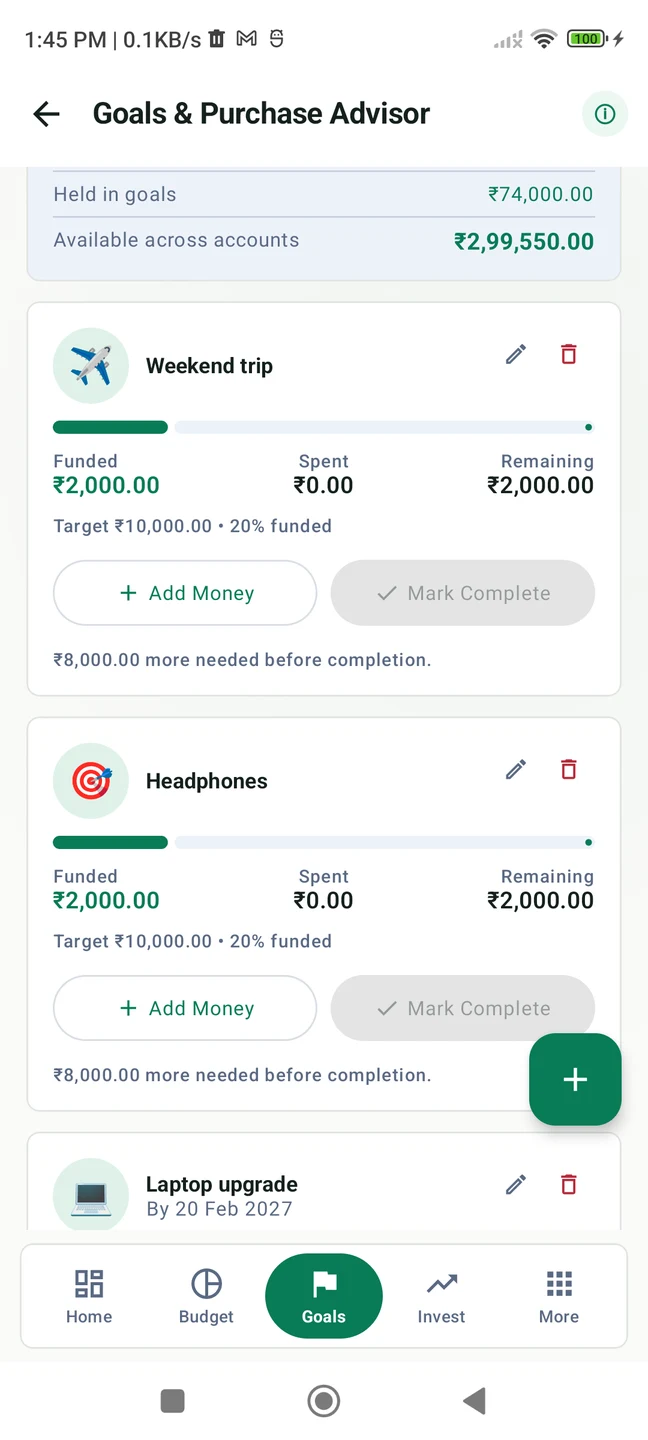
In our fictional example, a weekend trip has a ₹10,000 target. Contributions recorded towards it total ₹2,000, so the goal shows 20% progress and ₹8,000 still to go. Those figures describe the goal’s records; creating a goal does not open an account, move money or reserve funds at a bank.
Start with a plan you can name and an amount you want to track. A target date can make the plan more specific, but it does not guarantee that the target will be reached. You choose what to contribute and make any actual transfer through your usual payment or banking service.
Create your first goal
- Open Goals in MyPaisa. Tap the plus control to create a savings goal.
- Give it a recognisable name. For this example, use Weekend trip. Choose an icon that helps you spot it again.
- Enter the target. Set ₹10,000 as the amount you want to work towards. Add a target date if you have one in mind.
- Create the goal. It appears in your goals list, ready for you to record contributions.
- Record money you have set aside. Once you have made your own decision and any necessary transfer, record the contribution against the goal. Review the amount and selected account before saving.
- Return to its progress. With ₹2,000 recorded against a ₹10,000 target, the example shows 20%. Check both the amount and the target when reviewing the progress bar.
Keep a goal separate from everyday spending
A category budget answers what is left to spend within a monthly limit. A savings goal answers how much you have recorded towards a named target. They can support the same plan, but they describe different things. You might use a Food Dining budget to understand current spending while recording separate progress towards the weekend trip.
Before recording another contribution, check what you have already entered. Use the app’s records alongside your own account information, especially if the money is spread across accounts. MyPaisa does not independently verify that a bank transfer took place.
MyPaisa also includes an Emergency Fund area where you can enter monthly expenses and choose a number of months of cover. Its calculated target is a planning reference, separate from the trip example. It is not an insurance product or a guarantee that all unexpected costs will be covered.
Know the access and privacy details
Financial records stay on your phone. Separate network services verify trial and Pro access and fetch public market prices. Some capabilities require Pro or an active trial. The 30-day Pro trial excludes paid themes; basic free tools remain afterwards. Optional lifetime Pro is ₹249 one-time in India. The images and demo use showcase v1.5.4 with fictional data.
Get MyPaisa for Android. Read the budget guide, check the privacy policy or visit support.